Tuesday, March 17, 2020

Making custom function for spreadsheet


  1. Open a new spreadsheet, on the menu tab, choose Tools > Script editor
  2. Now you can write your own function in javascript
  3. This is a simple function that wraps HTML input tags

/**
* Generate a string for input tag.
*
* @param {"text"} type - type can be checkbox, text,....
* @param {"region"} name - name is required for php form.
* @param {"parent_form"} id -  .
* @param {"table01"} clas -  .
* @param {"country-of-birth"} placeholder - .
* @return the tring wraped with input tags.
* @customfunction
*/

function htmlInput(type,name,id,clas,placeholder){
  var outputString = '<input type=';
  var qm = '\"';//qm: quotation mark
  var space = ' ';
  outputString = outputString.concat(qm,type,qm,space);
  if(name){
    outputString = outputString.concat('name=',qm,name,qm,space);
  }
  if (id) {
    outputString = outputString.concat('id=',qm,id,qm,space);
  }
  if (clas) {
    outputString = outputString.concat('class=',qm,clas,qm,space);
  }
  if (placeholder) {
    outputString = outputString.concat('id=',qm,placeholder,qm,space);
  }
  outputString = outputString.concat('>')
  return (outputString);
}


Documentation style using JSDoc
  1. Now, you can use it in your spreadsheet

Friday, December 27, 2019

If của Rudyard Kipling

If you can keep your head when all about you  
    Are losing theirs and blaming it on you,  
If you can trust yourself when all men doubt you,
    But make allowance for their doubting too;  
If you can wait and not be tired by waiting,
    Or being lied about, don’t deal in lies,
Or being hated, don’t give way to hating,
    And yet don’t look too good, nor talk too wise:

If you can dream—and not make dreams your master;  
    If you can think—and not make thoughts your aim;  
If you can meet with Triumph and Disaster
    And treat those two impostors just the same;  
If you can bear to hear the truth you’ve spoken
    Twisted by knaves to make a trap for fools,
Or watch the things you gave your life to, broken,
    And stoop and build ’em up with worn-out tools:

If you can make one heap of all your winnings
    And risk it on one turn of pitch-and-toss,
And lose, and start again at your beginnings
    And never breathe a word about your loss;
If you can force your heart and nerve and sinew
    To serve your turn long after they are gone,  
And so hold on when there is nothing in you
    Except the Will which says to them: ‘Hold on!’

If you can talk with crowds and keep your virtue,  
    Or walk with Kings—nor lose the common touch,
If neither foes nor loving friends can hurt you,
    If all men count with you, but none too much;
If you can fill the unforgiving minute
    With sixty seconds’ worth of distance run,  
Yours is the Earth and everything that’s in it,  
    And—which is more—you’ll be a Man, my son!
Nếu con có thể ngẩn cao đầu khi mọi người
    Rối trí và đỗ lỗi cho con,
Nếu con tin vào bản thân dù tất cả nghi ngờ,
    Nhưng chấp nhận những điều nghi kị đó;
Nếu con chờ và không hề mỏi mệt,
    Hoặc bị lừa dối, nhưng không đáp trả,
Hay bị ghét bỏ, nhưng không để câm ghét cản trở,
    Và đừng tỏ ra quá tốt, hoặc nói lời khôn ngoan:

Nếu con có thể mơ—và không để giấc mơ làm chủ;
    Nếu con có thể nghĩ—và không để suy nghĩ làm mục tiêu của mình;
Nếu con gặp Thành Công, và Thất Bại
    Và đối xử 2 kẻ mạo danh đó như nhau;
Nếu con dám nghe lời nói của mình
    Bị thay đổi bởi những kẻ gian manh để bẫy những tên dại khờ,
Hoặc nhìn những thứ con xây nên, sụp đổ,
    Và con đứng lên, gầy dựng lại với những thứ đã mòn:

Nếu con có thể đặt cược những thứ con có
    Thử trong một ván cờ
Và thất bại, phải bắt đầu lại từ đầu
    Và không nói một lời về những mất mát;
Nếu con có thể bắt con tim, lý trí và cơ bắp
    Làm việc sau khi đã rã rời,
Và vững tin khi không còn gì trong con
    Trừ Ý Chí thúc giục: “Hãy cố lên!”

Nếu con có thể nói với đám đông nhưng giữ phẩm giá,
    Hoặc đi với nhà vua—và không mất đi sự chan hòa,
Nếu kẻ thù và bạn tốt không thể làm đau con,
    Nếu mọi người dựa vào con, nhưng con không dựa vào họ quá nhiều;
Nếu con có thể tận dùng từng phút không khoan nhượng
    Với 60 giây đáng giá,
Thế giới này, và mọi thứ trong đó là của con,
    Và—điều quan trọng hơn—Con là đàn ông, con trai!


Thursday, December 12, 2019

How VU meter works?

I meet a cool classmate name Tri who major in CS and wants to program a microcontroller. I'm just a noob in a microcontroller world but I love to explore new things.
We come up with an idea, making a VU with Christmas light.

After looking at other projects, I realize that a microcontroller will read AC signal from an output source, then it will separate the voltage into each level and display them accordingly.

Let's look at a snippet from Instructable(1):
else
    {
      for (i = 0; i < input; i++)
      {
        digitalWrite(led[i], HIGH);
        delay(4);
      }
      for (i = i; i < 11; i++)
      {
        digitalWrite(led[i], LOW);
      }
    } 

In the above code, maxInput is 12. Whenever there is a signal, LEDs that are less than the threshold will turn ON. Then, they will be set back to OFF.

Another example from Instructable(2):

GreatScott uses an analog approach.
  1. Audio (AC) is the main input source (1.3V).
  2. Create threshold values for 7 rows.
  3. So we use LM324 opamp to amplify the signal from 1.3V to 8V.
  4. Then, we build 7 comparators using the same type of opamp.
  5. Then we use MOSFET as a switch
  6. Control by using V_GS

Thursday, August 8, 2019

Generate Signal with Aduino

So I have a school project that requires sending square waves to a piezo controller. We avoid using Arduino Toolbox in Matlab because we have other peripherals that being controlled.
Our solution is to use serial communication in Matlab to control the Arduino board. Here is our code

Arduino:

unsigned long halfPeriod = 5000UL; // 5mS = 1/2 100 Hz
// don't use a floating # for delay, delayMicroseconds

void funcGen(){
  digitalWrite(11, LOW);
  delay(30);
  for(int i = 0; i< 8; i++){
      PINB = PINB | 0b00101000; // x-x-13-12-11-10-9-8 on Uno,
                            // toggle output by writing 1 to input register
      delayMicroseconds(halfPeriod);
    }
}

void setup()
{
Serial.begin(9600);
pinMode(13, OUTPUT);
digitalWrite (13, HIGH); // known starting level
pinMode(11, OUTPUT);
digitalWrite (11, LOW); // known starting level
}

void loop(){
if (Serial.read() > 0){
  funcGen();
  Serial.flush();
  }
}

Matlab:

arduino=serial('COM3','BaudRate',9600);
fopen(arduino)
fprintf(arduino,'1');
fclose(arduino);

Sunday, May 19, 2019

Calculate the length of monopole antenna

We have the formula for wavelength

in which c is the speed of light = 3*10^8 m/s

Practical Example:
A student has a receiver (MX-RM-5V) and a transmitter (FS1000A) in the 433MHz band. When he/she run the basic code sending "hello world", the distance between them is less than 10 cm. In order to increase the transmission distance, what is the length of the antenna should he/she add?

3*10^8 / 433 * 10^6  =  0.6928 meter

so for half-wavelength antenna: 0.5 * 0.6928 = 0.3464 meter
and for quater-wavelength antenna: 0.25 * 0.6928 = 0.1732 meter or 17.32 cm

That is the reason we want to add the carrier frequency to reduce the length of the antenna.

The range is improved significantly after the antennas are inserted


Wednesday, January 16, 2019

Fun scripts in cmd

In this post, I’ll represent temporary parameter by using %name of parameter%, you need to change the whole thing with your parameter. Please take a look at the example below. The reason I use %name of parameter% because it represent a variable in batch file.

simpleBatch.bat (run as administrator)

@echo off
setlocal
set username=olaf
REM create new user
net user %username% /add
net user
pause
Result:
Administrator DefaultAccount Guest
xxx olaf xxx

Start or Stop or enable type of service in cmd

sc config %service name% start=auto
net start %service name%
Ex (remember to change %service name% to service name you want to enable):
sc config RemoteRegistry start=auto
net start RemoteRegistry

Find particular service in cmd

sc query type=service state=all | findstr /i “remote”
/i: case insensitive

Add key or value to registry

reg add “%directory%” /v %value% /t %type_of_value% /d %data%
You can read more here
/t:
REG_BINARY // Free form binary
REG_DWORD // 32-bit number
REG_DWORD_LITTLE_ENDIAN // 32-bit number (same as REG_DWORD)
REG_DWORD_BIG_ENDIAN // 32-bit number
REG_LINK // Symbolic Link (unicode)
REG_MULTI_SZ // Multiple Unicode strings
REG_RESOURCE_LIST // Resource list in the resource map
REG_FULL_RESOURCE_DESCRIPTOR // Resource list in the hardware description
REG_QWORD // 64-bit number

Shutdown a computer

shutdown /m %name_of_the_network_machine% /s /f
/s: shutdown
/f: forced shutdown

Hide user in log in screen

We need to add “SpecialAccounts\UserList” sub-key under Winlogon
In cmd:
reg add “\%computer_name%”\HKEY_LOCAL_MACHINE\SOFTWARE\Microsoft\Windows NT\CurrentVersion\Winlogon\SpecialAccounts\UserList" /v %user_name_to_be_hidden% /t REG_DWORD /d 00000000

Disable UAC (User Account Control) restrictions in order to remote control computer

reg add “HKEY_LOCAL_MACHINE\SOFTWARE\Microsoft\Windows\CurrentVersion\Policies\System” /v LocalAccountTokenFilterPolicy /t REG_DWORD /d 00000001

Create a new user with admin privilege

net user %your user name% /add
net localgroup administrators %username% /add

Delete a user

net user username /delete

Change user password

net use %username% %password%

Login to the network

net use \name_of_computer_in_nw

Extend the maximum login

net accounts /maxpwage:%duration%

Thursday, January 10, 2019

How to exit Status: Disconnected and flash firmware for MOD-t Newmatter

The reason MOD-t printer ultility show Disconnected is because it's in DFU mode.
To exit, we can reflash the firmware


1. First, if you just get the printer, we need to install newest software and firmware for it.

https://github.com/tripflex/MOD-t You can find both software and firmware at the link above
I'll use the newest one because the developer said that it will improve the printer speed
https://github.com/tripflex/MOD-t/raw/master/firmware/1.0.0/firmware.dfu

2. After downloading the file, you should rename it to "firmware_modt_override.dfu" and move to C:/

We also need to download flashing tool: https://github.com/tripflex/MOD-t/blob/master/firmware/dfu-util.exe And put that in C:/ directory

3. Before flashing the firmware, we need to put MOD-t into DFU mode

if you use Windows, you might need to install libusb-win32 here: https://sourceforge.net/projects/libusb-win32/
after installing the software, click Install a Device Filter and Choose MOD-t
Run the enter_dfu.py script (it can be found in tripflex repo)


4. Now we can flash the firmware

press: Window + R > type cmd
type: cd C:/
type: dfu-util.exe -d 2b75:0003 -a 0 -s 0x0:leave -D firmware_modt_override.dfu
Done!
You can try your first print now.
Good luck!

Wednesday, January 9, 2019

Make a tube/pipe with FreeCAD

Why I Chose FreeCAD

I chose FreeCAD because it runs smoothly on my old laptop compared to AutoCAD.

Getting Started

There are two methods to create a pipe in FreeCAD that I’m familiar with.

Method 1: Using Draft and Sketcher

  1. Open FreeCAD:

    • Create a new document (Ctrl + N).
  2. Create a Circle:

    • From the dropdown menu, select Draft.
    • Draw a circle. You can adjust its location and radius later using the options in the left corner box.
  3. Set the Viewing Plane:

    • You are currently in the YX plane (visible in the right corner).
    • Press 0 to switch to the 3D view, and then press 1 to view the object in the XZ plane.
  4. Create a Sketch:

    • Select Sketcher from the dropdown menu.
    • Create a new sketch and draw a circle with its origin at the center.
    • Use the Circle Constraint to set its radius.
  5. Draw a Perpendicular Line:

    • Create a new sketch on the XZ plane.
    • Draw a straight line from the origin, and set the constraints.
  6. Sweep the Circle Along the Line:

    • Choose Part from the dropdown menu and rename the circle and line.
    • Select Sweep and choose the circle as the profile.
    • Set the Sweep Path to the straight line and click Done.
  7. Create a Pipe:

    • To create a pipe, select the top and bottom surfaces of the cylinder.
    • Press 0 to choose the top surface, then press 5 and Ctrl to choose the bottom surface.
    • Click the Thickness icon and press OK. Your pipe is now complete.

Method 2: Using Create Primitives

  1. Open FreeCAD:

    • Create a new document (Ctrl + N).
  2. Select Part:

    • From the dropdown menu, choose Part.
  3. Create a Cylinder:

    • Select Create Primitives and choose the cylinder shape from the left-hand side.
    • Set the radius and height for your cylinder.
  4. Follow Steps from Method 1:

    • Repeat the steps for sweeping and setting thickness from Step 14 in Method 1.

Done!

Friday, October 19, 2018

Control LED board by phone with ESP8266 and MAX7219

Testing NodeMCU with 4 x 8x8 LED Matrix

Date: 10/19/2018

Introduction

This project aims to use a smartphone to control an LED board as a turning signal. The ESP8266 will serve multiple roles: Access Point, microcontroller, and server. The web server will host a simple webpage featuring three buttons: "Turn LEFT," "Turn RIGHT," and "Turn SOS." These commands will trigger scrolling text on the LED boards.

Initially, I tested two libraries: Arduino Core WiFi and ESP8266WebServer. While Arduino Core WiFi lacked efficient request handling (requiring the use of client.readStringUntil(\r) which was slow), the ESP8266WebServer library performed well and was selected for this project.

Required Items

NoDescriptionQuantity
1NodeMCU ESP12E1
24 LED Boards with MAX72191
35V Power Supply1

Procedures

  1. Connect the LED Board to Power Supply:

    • Connect the LED board to the 5V power supply.
  2. Wire the MAX7219 to NodeMCU:

    • Connect the following pins:
      • VCC to 5V
      • GND to GND
      • DIN to D7 (MOSI - GPIO 13)
      • CS to D8 (GPIO 15)
      • CLK to D5 (GPIO 14)
  3. Identify the LED Board Type:

    • Determine the type of LED board you are using. In this example, I used the FC16_HW type. You can read more about it here.
  4. Setup Arduino IDE:

    • Configure the Arduino IDE with the appropriate settings for NodeMCU 12E.
  5. Set Up WiFi Access Point (AP):

    • Configure the ESP8266 to act as a WiFi Access Point.
  6. Handle Requests:

    • Write void functions to handle the requests corresponding to each button (LEFT, RIGHT, SOS).
  7. View My Code:

    • The code for this project is available here.
  8. Video Tutorial:

Good Luck!

Wednesday, September 12, 2018

Arduino and 8x8 LED matrix


This is the datasheet: http://www.kingbrightusa.com/images/catalog/SPEC/TC15-11SRWA.pdf
I made the table below for easily wiring. Also, the pin of the array start from 1 - 8, and 9 - 16. To determine the location of the pin, you can start wiring 2 left side, or right side pin to 3.3V and GND. According to the table below, the when we connect pin 1 and 16 together, the LED at position Row 5:Column 8 will light up.

R and C Pin on LED board Pin on Arduino
r5 1 6
r7 2 8
c2 3 11
c3 4 12
r8 5 9
c5 6 a0
r6 7 7
r3 8 4
r1 9 2
c4 10 13
c6 11 a1
r4 12 5
c1 13 10
r2 14 3
c7 15 a2
c8 16 a3

I'll talk briefly about how it works and you can try it your own.

We have a Row and a Col(column), when both Row and Col are set to 1, the LED will off, so to keep the LED on, we set Row to 1 and Col to 0 at specific location.

We're going to use for loop run from row 1 to 8 and set each row to 1
Then, we use another for loop to set each column to either 1 or 0
Finally, we reset the whole column

Using the available code, I need to fix couple things

  1. I rearrange col array from 8 to 1
  2. Set inverse for the buffer 

The code from Arduino Project Hub is clever
I've learned that to manage grids or matrix we should add all pins to constant array rows and columns such as:

const byte rows[] = {
    ROW_1, ROW_2, ROW_3, ROW_4, ROW_5, ROW_6, ROW_7, ROW_8
};
const byte col[] = {
  COL_1,COL_2, COL_3, COL_4, COL_5, COL_6, COL_7, COL_8
};
The code and tutorial is here: https://create.arduino.cc/projecthub/SAnwandter1/programming-8x8-led-matrix-23475a

What we can do next?
👉Control LED board with Android or Iphone using ESP82
👉Add this board to my RC car pj
👉Add MAX7219

Sunday, August 26, 2018

Learn AI

youtube: https://www.youtube.com/watch?v=cKxRvEZd3Mw
classifier
giving a sample -> say it's apple
supervised learning

pip install -U numpy scipy

http://scikit-learn.org/stable/install.html
https://www.tensorflow.org/

Sonic Pi

Learn more at: https://github.com/samaaron/sonic-pi/wiki/Sonic-Pi-Internals

Here is my code:

Thursday, April 26, 2018

S-Parameter or Reflection Coefficient

S_11 = 0 dB: all power is reflected back to antenna
S_11 = -10 dB
S_11 = reflected signal / transmitted signal
S parameter is also called reflection coefficient 


Saturday, April 21, 2018

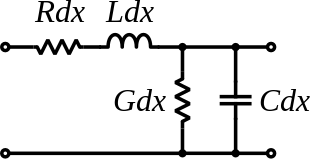
Antenna Index


VSWR

>> Voltage Standing wave ratio is defined as:
>> \Gamma is the voltage reflection coefficient at the input terminal of the antennas 
Z_in = antenna input impedance 
Z_o = Characteristic impedance of the transmission (Tx) line

>> So what is the Tx line or transmission line?
The transmission line is two wires running parallel to each other
To find the Z_o (characteristic impedance) we can measure the voltage across and current of those two lines. Then, apply Ohm's law to find the impedance 

Furthermore, the Tx line is also represented as:
In which: 
L: magnetic field around the wire
R: resistance across 2 wires
C: how electron repel each other
G: dielectric material separate conductors

Thursday, March 22, 2018

Testing MathJax and LaTex

I've realized that MathJax version 2.7.3 doesn't work so I move back to 2.7.2
Add these line below <header>

\begin{matrix}
A
\end{matrix}
=
\begin{bmatrix}
    $Z_{1}+Z_{2}+Z_{3} & -Z_{3} & 0 & 0 & 0 & 0 & 0\\
    -Z_3 & Z_3+Z_4+Z_5+Z_6 & -Z_6 & 0 & 0 & 0 & 0\\
    0 & 0 & -Z_7 & Z_7+Z_8+Z_9 & -Z_9 & 0 & 0\\
    0 & 0 & -Z_7 & Z_7+Z_8+Z_9 & -Z_9 & 0 & 0\\
    0 & 0 & 0 & -Z_9 & Z_9+Z_{10}+Z_{11} & -Z_{11} & 0\\
    0 & 0 & 0 & 0 & -Z_{11} & Z_{11}+Z_{12}+Z_{13} & -Z_{13}\\
    0 & 0 & 0 & 0 & 0 & -Z_{13} & Z_{13}+Z_{14}$
\end{bmatrix}

Friday, January 19, 2018

Make Your Bed

My favorite quote from this book "If you want to change the world, measure a person by the size of their heart, not the size of their flippers."

The book has ten chapters with ten lessons from the author's experiences.

Chapter one: start your day with a task completed
___before training, all the trainees have to make their bed in certain way. If not, they have to roll on the sand like a "sugar cookie".
___The purpose is to motivate oneself with a completed task throughout a day.

Chapter two: you can't do it alone
___"you need people in your life to help you through the difficult times"
___the author was put in a rubber boat with a team. Sometime, one of his teammates was getting sick, other members had to put more work to keep the boat running.
___Once, the author was hospitalized. His wife took care of him and never let him fell pity for himself. She reminded him about the tough man he used to be. His admiral and other teammates came to help him.
___his advice: "Find someone to share your life with. Make many friends as possible, and never forget that your success depends on others."

Chapter three: only the size of your heart matters
___before the training, the recruiter mocked a little trainee because he was five foot tall. The sailor simply said "I won't quit!". Then, the recruiter whisper ""Prove me wrong!"
___The sailor finished the swim faster than anyone.
___"SEAL training was always about proving something. Proving that size didn’t matter. Proving that the color of your skin wasn’t important. Proving that money didn’t make you better. Proving that determination and grit were always more important than talent."

Chapter four: life's not fair -- drive on!
___Moki was a athlete, a competitive SEAL that the author admired. Unfortunately, he involved in a bicycle crash and was in wheelchair. He never complained and felt pity!
___Don't complain, don't blame it on your misfortune. Stand tall, look to the future, and drive on!

Chapter five: failure can make you stronger
___if trainees failed to meet standards on training day, they had to take Circus test. That is an intensity test that led to fatigue and make trainees failed again on the next day; however, in the final test, the ones that took Circus test finished first
___Failure strengthen men when they learn from it.

Chapter six: you must dare greatly
___if you live in fear, you'll never achieve your potential. Just pushing your limits.

Chapter seven: stand up to the bullies
___the trainees had to swim at night with caution that they might confront with sharks.
___in order to pass the ocean, they had to swim and punch in the eyes of the sharks.

Chapter eight: rise to the occasion
___in any dark moment, don't loose yourself, be your very best.

Chapter nine: give people hope
___trainees were stuck in mud. They started singing and moving on even though the coach did not let them.
___when you are in mud, and sing along, that not only helps yourself but also lift other people up. Giving them hope that tomorrow will be better.

Chapter ten: never, ever quit!
___trainees can ring the bell and quit Navy SEALs.

Last notes:
"Life is full of difficult times. But someone out there always has it worse than you do. If you fill your days with pity, sorrowful for the way you have been treated, bemoaning your lot in life, blaming your circumstances on someone or something else, then life will be long and hard. If, on the other hand, you refuse to give up on your dreams, stand tall and strong against the odds—then life will be what you make of it—and"

"Remember… start each day with a task completed. Find someone to help you through life. Respect everyone. Know that life is not fair and that you will fail often. But if you take some risks, step up when times are toughest, face down the bullies, lift up the downtrodden, and never, ever give up—if you do these things, then you can change your life for the better… and maybe the world!"


Why we tenderize meat with pineapple?

short answer: there is an enzyme in pineapple called Bromelain (Bro-mer-lan) that break peptide bonds in amino acid. Recall that the chain of amino acid with peptide bonds is protein.
So the Bromelain enzyme will break down protein by separating peptide bond.

Sunday, December 31, 2017

YRNSS summary

Chapter 1 - Priming
we have two minds, emotion and ration. Emotion creates autopilot mode, which is in animals because they have small
This chapter talks about 'priming' the act of convincing people emotionally. For example, the clothes you wear in a job interview. We can try by a smile and thank-you that would affect the way others feel
Summary in one sentence (SIOS):

Chapter 2 - Confabulation
In this chapter, the author mentions about 'split-brain' syndrome when left and right brains are separated  for medical treatment.
Then, the author concludes that we're living in hybrid non-fiction life, in which the experience plus the emotion are mixed together.
SIOS:

Chapter 3 - Confirmation Bias
People want to hear what they want to hear. They look around to find something similar to them to support their ideas. The world is filtered out by their belief, rather see things as they are. People tend to compare things with their beliefs to confirm they are right.
 --> SIOS: Confirmation bias occurs when a person seeking for validation of their actions or beliefs, way to avoid it is to find evidence, fact, to support the contrary, if not, accept the truth.

Chapter 4 - Hindsight Bias
--> SIOS:people update new information and less likely compare with the previous information to find the truth.

Chapter 5 - The Texas Sharpshooter Fallacy
Our lives involve chance.

Chapter 6 - Procrastination
metacognition :: think about thinking

Chapter 7 - Normalcy Bias
THE MISCONCEPTION: Your fight-or-flight instincts kick in and you panic when disaster strikes.
THE TRUTH: You often become abnormally calm and pretend everything is normal in a crisis.

Chapter 8 - Introspection
THE MISCONCEPTION: You know why you like the things you like and feel the way you feel.

THE TRUTH: The origin of certain emotional states is unavailable to you, and when pressed to explain them, you will just make something up.

Chapter 9 - The Availability Heuristic


Chapter 10 - The Bystander Effect
THE MISCONCEPTION: When someone is hurt, people rush to their aid.
THE TRUTH: The more people who witness a person in distress, the less likely it is that any one person will help.

Chapter 11 - The Dunning-Kruger Effect
THE MISCONCEPTION: You can predict how well you would perform in any situation.
THE TRUTH: You are generally pretty bad at estimating your competence and the difficulty of complex tasks

Chapter 12 - Apophenia
THE MISCONCEPTION: Some coincidences are so miraculous, they must have meaning.
THE TRUTH: Coincidences are a routine part of life, even the seemingly miraculous ones. Any meaning applied to them comes from your mind.

Chapter 13 - Brand Loyalty
THE MISCONCEPTION: You prefer the things you own over the things you don’t because you made rational choices when you bought them.
THE TRUTH: You prefer the things you own because you rationalize your past choices to protect your sense of self.

Chapter 14 - The Argument from Authority
THE MISCONCEPTION: You are more concerned with the validity of information than the person delivering it.
THE TRUTH: The status and credentials of an individual greatly influence your perception of that individual’s message.

Chapter 15 - The Argument from Ignorance
THE MISCONCEPTION: When you can’t explain something, you focus on what you can prove.
THE TRUTH: When you are unsure of something, you are more likely to accept strange explanations.

Chapter 16 - The Straw Man Fallacy
THE MISCONCEPTION: When you argue, you try to stick to the facts.
THE TRUTH: In any argument, anger will tempt you to reframe your opponent’s position.

Chapter 17 - The Ad Hominem Fallacy
THE MISCONCEPTION: If you can’t trust someone, you should ignore that person’s claims. THE TRUTH: What someone says and why they say it should be judged separately.
we tend to analyze the character of a person and believe it's consistent; however, we also need "evidence to avoid delusion"
For example: an astronaut can be a murder

Chapter 18 - The Just-World Fallacy
THE MISCONCEPTION: People who are losing at the game of life must have done something to deserve it.

THE TRUTH: The beneficiaries of good fortune often do nothing to earn it, and bad people often get away with their actions without consequences.

Chapter 19 - The Public Goods Game
THE MISCONCEPTION: We could create a system with no regulations where everyone would contribute to the good of society, everyone would benefit, and everyone would be happy.
THE TRUTH: Without some form of regulation, slackers and cheaters will crash economic systems because people don’t want to feel like suckers.

Chapter 20 - The Ultimatum Game
THE MISCONCEPTION: You choose to accept or refuse an offer based on logic.

THE TRUTH: When it comes to making a deal, you base your decision on your status.

Chapter 21 - Subjective Validation
THE MISCONCEPTION: You are skeptical of generalities.

THE TRUTH: You are prone to believing vague statements and predictions are true, especially if they are positive and address you personally.

Chapter 22 - Cult Indoctrination


Chapter 23 - Groupthink


Chapter 24 - Supernormal Releasers


Chapter 25 - The Affect Heuristic


Chapter 26 - Dunbar’s Number


Chapter 27 - Selling Out


Chapter 28 - Self-Serving Bias


Chapter 29 - The Spotlight Effect


Chapter 30 - The Third Person Effect


Chapter 31 - Catharsis


Chapter 32 - The Misinformation Effect


Chapter 33 - Conformity


Chapter 34 - Extinction Burst


Chapter 35 - Social Loafing


Chapter 36 - The Illusion of Transparency


Chapter 37 - Learned Helplessness


Chapter 38 - Embodied Cognition


Chapter 39 - The Anchoring Effect


Chapter 40 - Attention


Chapter 41 - Self-Handicapping


Chapter 42 - Self-Fulfilling Prophecies


Chapter 43 - The Moment


Chapter 44 - Consistency Bias


Chapter 45 - The Representativeness Heuristic


Chapter 46 - Expectation